
Do You Need a VPN for IPTV Canada 2026? Complete Guide
VPN for IPTV Canada is one of the most searched topics by Canadian streamers in 2026 — and for good reason. Your internet provider can see everything you stream, throttle your connection during peak hours, and slow down your IPTV service right when you need it most. But does that mean you actually need one?
This complete VPN for IPTV Canada guide explains when a VPN genuinely helps, when you can skip it, which providers perform best, and how to set everything up without losing speed. Whether you are a new IPTV subscriber or experiencing throttling, this guide has your answer.
Do You Actually Need a VPN for IPTV Canada?
The short answer is no — a VPN for IPTV Canada is not required. Your subscription works perfectly without one. However, there are three situations where a VPN makes a real difference for Canadian IPTV users.
✅ Use a VPN When…
→ Your ISP throttles streaming (Bell, Rogers, Shaw)
→ You stream on public Wi-Fi (hotels, airports)
→ You want privacy from your ISP logging activity
❌ Skip the VPN When…
→ Your connection is fast and stable already
→ You are on fibre with no throttling issues
→ You only stream at home on a secure network
For most Canadians on fibre internet streaming at home, IPTV works beautifully without a VPN. But if you notice buffering specifically during peak hours (7 PM to 10 PM) while your speed test looks normal, ISP throttling is likely the cause — and a VPN for IPTV Canada is the permanent fix. Also check our buffering troubleshooting guide for additional solutions.
How Canadian ISPs Throttle IPTV — VPN for IPTV Canada Explained
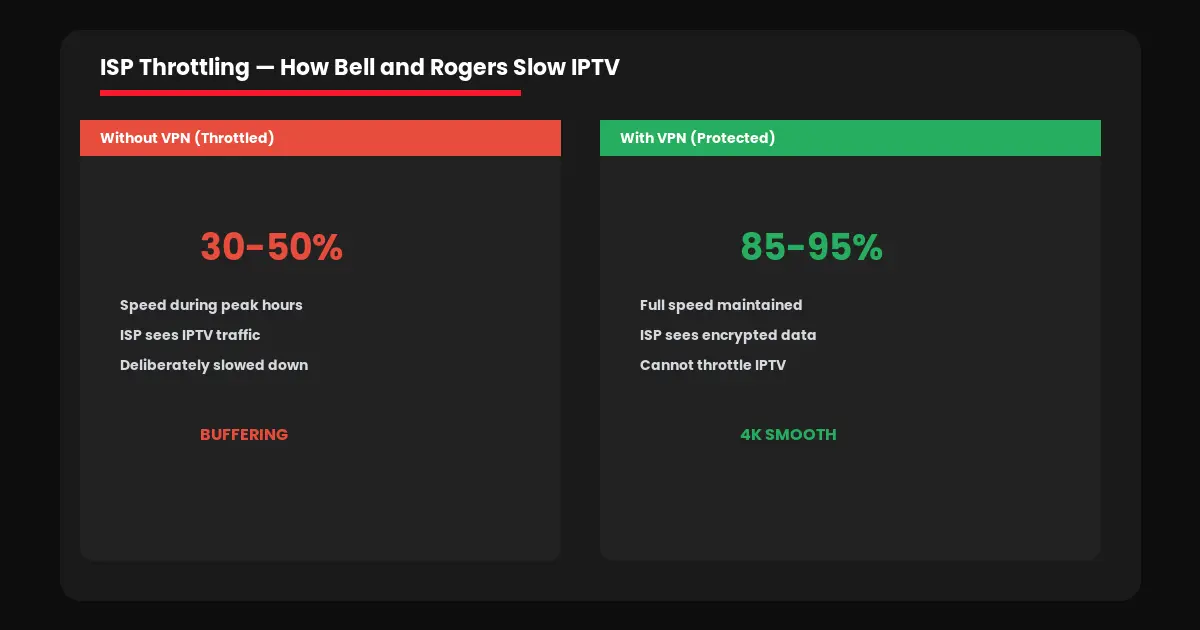
ISP throttling is the number one reason Canadians need a VPN for IPTV Canada. Bell, Rogers, Shaw, and Telus use Deep Packet Inspection to identify streaming traffic on their networks. When they detect IPTV streams during peak evening hours, they deliberately slow down that traffic.
This is why your speed test might show 150 Mbps while your IPTV buffers constantly. The speed test measures general bandwidth but does not reveal ISP throttling of specific streaming protocols. A VPN for IPTV Canada solves this by encrypting your connection so your ISP cannot identify what you are streaming.
How to Test if Your ISP Is Throttling IPTV
Step 1: Stream IPTV during peak hours (7-10 PM) and note any buffering.
Step 2: Run a speed test at fast.com — note your download speed.
Step 3: Connect a VPN to a Canadian server and stream the same channel.
Result: If IPTV works perfectly with VPN but buffers without — your ISP is throttling.
Best VPN for IPTV Canada — Top 3 Picks in 2026
Not every VPN works well for streaming. Free VPNs are too slow and log your data. Here are the three best options for a VPN for IPTV Canada based on speed, Canadian servers, and streaming compatibility.
NordVPN
~$4.49/mo
Fastest speeds in Canadian server tests. 1,000+ servers in Canada (Toronto, Montreal, Vancouver). NordLynx protocol maintains 90%+ speed — critical for 4K IPTV. Works on Firestick, Android, Smart TV, PC, and phones.
Surfshark
~$2.99/mo
Unlimited simultaneous connections — one subscription covers your entire household. Servers in Toronto, Montreal, Vancouver. Best budget VPN for IPTV Canada families.
ExpressVPN
~$8.32/mo
Most established provider with dedicated Firestick app on Amazon Store. Lightway protocol, 30-day money-back guarantee. Premium price but rock-solid reliability for IPTV streaming.
How to Set Up a VPN for IPTV Canada — Step by Step
Setting up a VPN for IPTV Canada takes 5 minutes on any device. The critical rule — always connect to a Canadian server for the lowest latency and best IPTV performance.
Firestick: Search VPN in Amazon App Store → Install → Login → Connect Canada → Open IPTV app. Firestick guide →
Android: Download from Google Play → Login → Connect Canada → Launch IPTV. Android guide →
Smart TV: Install VPN on your router — protects all devices including TVs that cannot install apps. Smart TV guide →
PC/Mac: Download VPN desktop app → Connect Canada → Open IPTV player. PC guide →
Once connected, test your VPN for IPTV Canada setup with a free 24-hour trial before committing to a subscription. This lets you verify performance on your internet connection and device. For app recommendations, check our best IPTV apps Canada guide.
Speed Impact — VPN for IPTV Canada Performance 2026
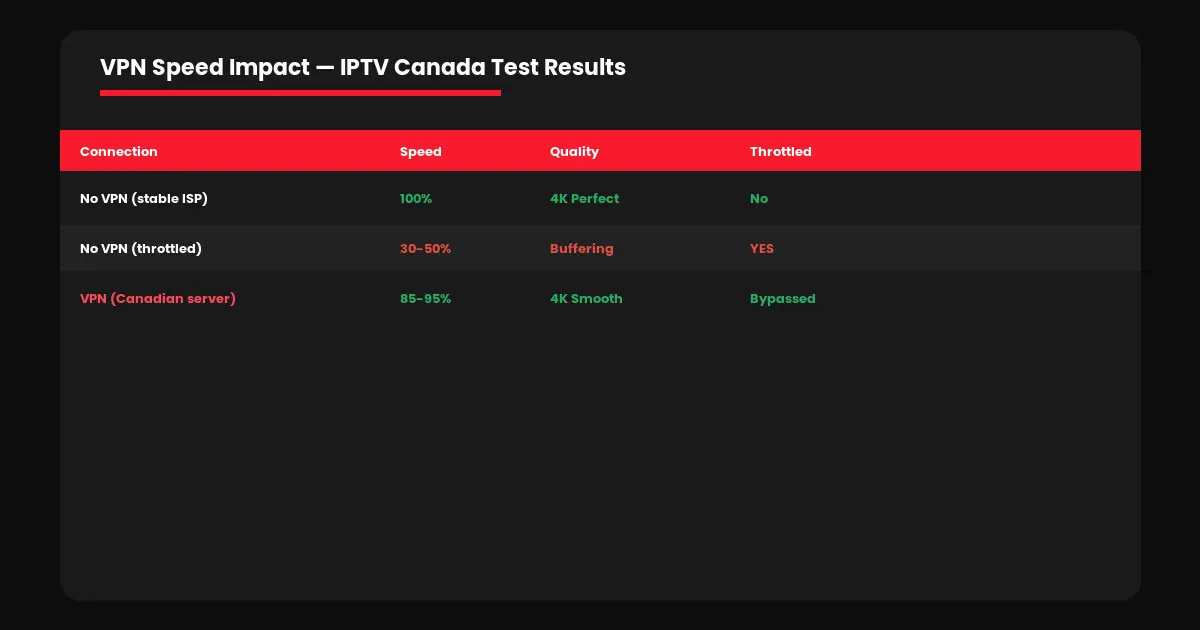
| Connection | Speed | Quality | Throttled? |
|---|---|---|---|
| No VPN (no throttling) | 100% | 4K | No |
| No VPN (throttled ISP) | 30-50% | Buffering | Yes |
| VPN (Canadian server) | 85-95% | 4K smooth | Bypassed |
| VPN (US server — avoid) | 50-70% | HD only | Bypassed |
A quality VPN for IPTV Canada on a Canadian server reduces speed by only 5 to 15 percent — barely noticeable. If your ISP throttles, the VPN actually makes streaming faster. For the best overall experience, visit IPTV Canada Officiel and read our IPTV vs cable comparison and IPTV legality guide.
Frequently Asked Questions — VPN for IPTV Canada
No. IPTV works without a VPN. A VPN is recommended if your ISP throttles streaming, you use public Wi-Fi, or you want privacy from your internet provider.
A quality VPN on a Canadian server reduces speed by only 5 to 15 percent. If your ISP throttles, a VPN makes IPTV faster by preventing the throttling entirely.
Always connect to a Canadian server — Toronto, Montreal, or Vancouver. US or European servers add delay and reduce streaming quality.
No. Free VPNs have speed caps, data limits, and log your activity. They make buffering worse. Use NordVPN, Surfshark, or ExpressVPN instead.
Some Canadian ISPs throttle streaming during peak evening hours (7-10 PM). If IPTV buffers only at night while your speed test is fine, throttling is likely.