
How to Install IPTV on Kodi Canada 2026
How to install IPTV on Kodi Canada is one of the most searched setup questions among power users who want more customization than standard streaming apps offer. Kodi is a free, open-source media center that transforms into a full IPTV system once you add the right add-on — giving you a fully customizable interface, skins, and integration with your entire media library in one place.
This guide walks through exactly how to install IPTV on Kodi Canada step by step, using the PVR IPTV Simple Client — the most reliable and widely supported method. If you are coming from a simpler app like IPTV Smarters Pro, Kodi requires a bit more setup but rewards you with far more control.
[rank_math_toc]
Why Use Kodi for IPTV Instead of a Dedicated App?
Kodi was originally built as a media center for local files, but its plugin architecture makes it just as capable at handling live IPTV streams through the PVR (Personal Video Recorder) framework. Compared to dedicated apps like Smarters Pro or TiviMate, Kodi offers deeper customization — skins, add-ons for weather and music, and a unified library that blends your IPTV channels with local movies and shows.
Kodi also runs on hardware that dedicated streaming apps sometimes ignore — older Windows and Mac computers, Linux boxes, and DIY setups like Raspberry Pi media centers. If you already have a computer connected to your TV, Kodi turns it into a complete entertainment hub without buying any additional streaming hardware.
The tradeoff is setup complexity. Kodi requires installing and configuring an add-on rather than simply entering login credentials into a purpose-built app. For most casual viewers, apps like Smarters Pro remain simpler. But for users who already run Kodi as their media hub, adding IPTV is a natural extension worth the extra configuration steps.
🎨
Full Customization
Skins, layouts, and interface tweaks
📚
Unified Media Library
IPTV, local files, and add-ons together
🆓
Completely Free
Open-source, no purchase required
Step-by-Step — Install IPTV on Kodi
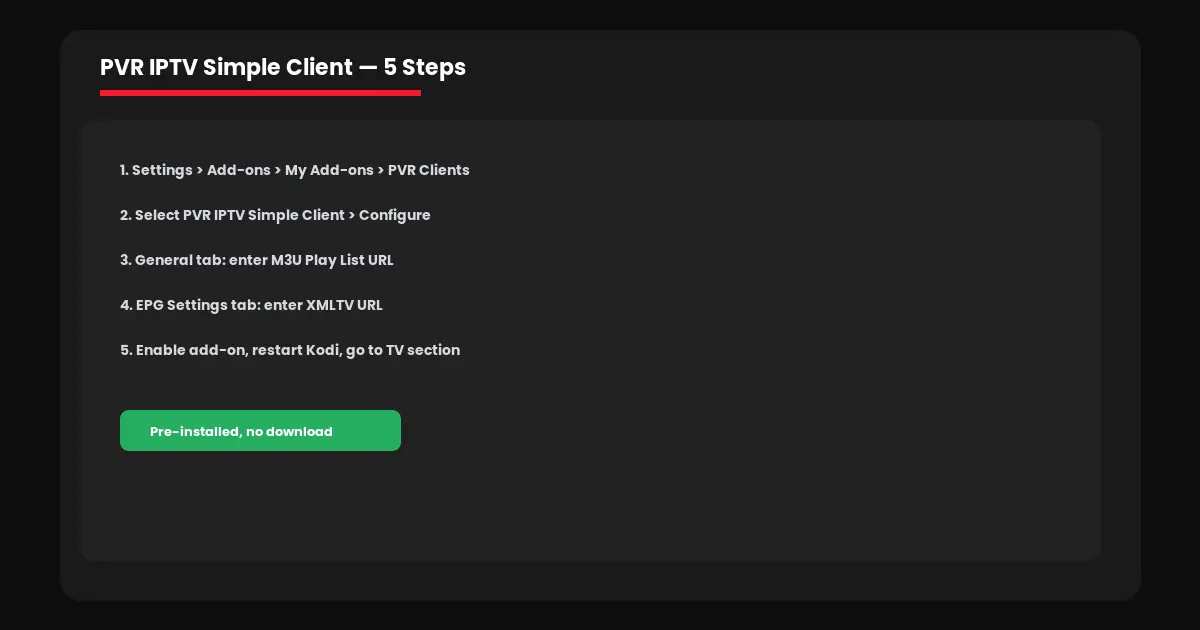
Here is the complete process for how to install IPTV on Kodi Canada using the built-in PVR IPTV Simple Client add-on — no third-party downloads required.
Step 1: Open Kodi and go to Settings (gear icon) → Add-ons → My Add-ons → PVR Clients.
Step 2: Select “PVR IPTV Simple Client” and click Configure (it comes pre-installed with Kodi).
Step 3: Under the General tab, set M3U Play List URL to your provider’s M3U link.
Step 4: Switch to the EPG Settings tab, set XMLTV URL to your provider’s EPG link.
Step 5: Click OK, then enable the add-on with the toggle switch. Restart Kodi and go to the TV section from the home menu.
After restarting, Kodi will sync your channel list and EPG data — this typically takes 5 to 15 minutes depending on how many channels your playlist contains. Once synced, all your channels appear in the TV section with a full program guide, just like our EPG setup guide describes for other apps.
Which Devices Support Kodi in Canada?
Kodi runs on nearly every platform, making how to install IPTV on Kodi Canada relevant regardless of what hardware you already own.
→ Firestick/Fire TV: Sideload via Downloader app. See our Firestick guide for sideloading basics.
→ Android TV boxes: Direct install from Google Play Store
→ Windows/Mac: Download the desktop installer from kodi.tv directly
→ Raspberry Pi: LibreELEC or OSMC distributions run Kodi as a dedicated media center OS
Notably, Kodi is not natively available on Apple’s App Store due to Apple’s policy restrictions, so iOS and Apple TV users typically stick with alternatives like dedicated Apple TV IPTV apps instead.
Useful Kodi Add-ons to Pair With IPTV
Part of what makes learning how to install IPTV on Kodi Canada worthwhile is the ecosystem of add-ons available once your live TV is running. A few genuinely useful companions include catch-up TV extensions that let you replay recently aired programs, subtitle add-ons that automatically fetch captions for any content, and skin packs that reorganize the entire interface around a TV-guide-first layout for a more cable-like feel.
Stick to add-ons from Kodi’s official repository when possible — third-party repositories carry more risk of instability or conflicts with your PVR client configuration.
Troubleshooting Kodi IPTV Setup
A few common issues come up when configuring how to install IPTV on Kodi Canada setups, and most have quick fixes.
Channels not loading: Double-check your M3U URL for typos — even a single wrong character breaks the connection entirely.
No program guide data: Confirm the XMLTV EPG URL is entered separately from the M3U URL — these are two different fields.
Buffering or freezing: Check your internet speed and consider a wired connection. Our complete buffering guide covers every fix in detail.
Ready to set up IPTV on Kodi or any other platform? Visit IPTV Canada Officiel for subscription plans with full Canadian channel coverage, or test everything first with a free 24-hour trial.
Kodi vs Dedicated IPTV Apps — Which Should You Choose?
Not everyone needs to learn how to install IPTV on Kodi Canada setups when simpler alternatives exist. The right choice depends on what you value most in your viewing experience.
Choose Kodi If…
You already use Kodi for local media, want deep customization, or plan to run add-ons beyond just live TV.
Choose Smarters Pro/TiviMate If…
You want the simplest possible setup with zero configuration beyond entering login credentials. See our app comparison guide.
Many power users actually run both — Kodi as their main media hub for movies and local content, alongside a simpler dedicated app on a second device for quick live TV access without navigating menus.
Frequently Asked Questions — IPTV on Kodi Canada
Yes. Kodi itself is completely free and open-source. You still need a separate IPTV subscription for the channels — Kodi is just the player.
It is a pre-installed Kodi add-on that connects your M3U playlist and EPG data to Kodi’s live TV interface, letting you watch IPTV channels within Kodi.
Yes, though Kodi requires sideloading on Firestick since it is not available directly in the Amazon App Store. The Downloader app makes this straightforward.
Apple’s App Store policies restrict apps like Kodi. Apple TV and iOS users typically use dedicated IPTV apps instead.
Typically 5 to 15 minutes after enabling the PVR add-on, depending on how many channels are in your playlist.