
IPTV Catch Up TV Canada — Complete 2026 Guide
IPTV catch up TV Canada is one of the most underrated features new subscribers overlook, yet it solves one of the most common frustrations with live television — missing a show because life got in the way. Instead of setting reminders or planning your evening around a broadcast schedule, catch-up lets you rewind and watch programs that already aired, often up to 24 or 48 hours after broadcast.
This guide explains exactly how IPTV catch up TV Canada works, which apps support it, how it differs from full DVR recording, and how to use it effectively. If you already use our EPG program guide to browse schedules, catch-up is the natural next feature to understand — it works directly alongside the guide you are already using.
[rank_math_toc]
What Is Catch-Up TV?
Catch-up TV lets you watch a program after it has already aired live, typically within a limited window of 24 to 72 hours depending on your provider. Unlike on-demand libraries with permanent access, catch-up content expires after this window — it is designed for recently missed shows, not long-term archives.
The feature works by having your provider’s servers continuously record every channel in the background, making those recent broadcasts available for playback on demand. You never have to manually trigger anything — the content is simply there, ready to watch, whenever you check within the catch-up window.
⏪
Automatic
No manual recording required
⏱️
24-72 Hour Window
Recently aired content only
💾
No Storage Needed
Stored on provider’s servers, not your device
Catch-Up TV vs DVR Recording — What’s the Difference?
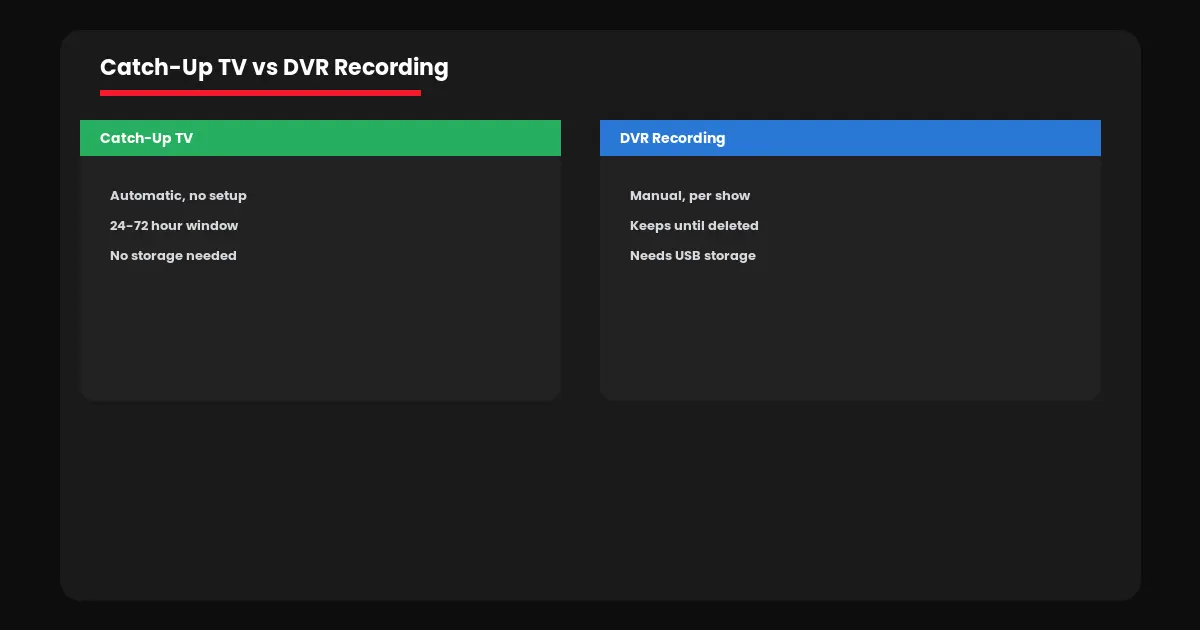
People often confuse IPTV catch up TV Canada features with DVR recording, but they work quite differently under the hood.
| Feature | Catch-Up TV | DVR Recording |
|---|---|---|
| Setup required | None — automatic | Manual, per show |
| Storage used | None (server-side) | USB or local storage |
| Availability window | 24-72 hours only | Until you delete it |
| Works for future shows | No, past broadcasts only | Yes, schedule ahead |
If you want to keep a show permanently or record something airing in the future, you need DVR recording instead. Catch-up is best for the specific scenario of missing something recent by accident and wanting quick access without any advance planning.
Which Apps Support Catch-Up TV
Not every IPTV app implements IPTV catch up TV Canada features identically, so knowing what to look for helps you choose the right app for this specific use case.
→ TiviMate: Strong catch-up integration directly within the EPG — a small icon marks which programs have catch-up available
→ IPTV Smarters Pro: Catch-up support varies by provider configuration; check our setup guide for details
→ Kodi: Catch-up works through specific PVR client configurations — see our Kodi setup guide for compatible add-ons
Availability also depends heavily on your provider — not every channel supports catch-up, and coverage varies by broadcaster agreements. Sports channels in particular often exclude catch-up for live events due to broadcast rights restrictions, even when regular entertainment channels support it fully.
How to Use Catch-Up TV
Using IPTV catch up TV Canada features is straightforward once you know where to look in your app.
1. Open your EPG program guide and scroll backward to a recently aired show.
2. Look for a play or rewind icon next to the program listing — this indicates catch-up is available.
3. Select the program and choose to play from the beginning.
4. Use standard playback controls to pause, rewind, or fast-forward through the catch-up content.
If catch-up icons never appear in your EPG, verify your provider actually supports the feature and that your app is updated to the latest version — older app versions sometimes lack proper catch-up display even when the underlying data is available.
Why Catch-Up TV Matters for Canadian Households
For busy households, IPTV catch up TV Canada support genuinely changes how you consume live television. Missing the first 20 minutes of a show because dinner ran late no longer means missing the show entirely — you simply catch up once things settle down, often the same evening.
This is particularly valuable for households across different time zones or with staggered schedules, where live viewing at broadcast time simply is not always realistic. Combined with a working EPG guide, catch-up transforms IPTV from a strict live-only experience into something considerably more flexible.
Ready to explore catch-up and every other feature a complete IPTV subscription offers? Visit IPTV Canada Officiel or start with a free 24-hour trial to test catch-up availability on your favorite channels.
Catch-Up TV Across Different Devices
Catch-up TV performance depends partly on your device’s processing power, since scrubbing through recently aired content requires the same decoding work as live streaming. On Firestick and modern Android TV boxes, catch-up playback feels essentially identical to live viewing — smooth seeking with minimal buffering when jumping to different points in a program.
On older or budget devices, you may notice a slightly longer load time when first accessing catch-up content compared to switching live channels, since the app needs to fetch the specific segment of server-side recording you requested rather than simply joining an already-streaming feed. This is normal and not a sign of a problem with your subscription.
If catch-up consistently loads slowly or fails across multiple channels, the underlying cause is more likely connection speed than device hardware — our buffering troubleshooting guide covers the same fixes that apply to live streaming, since catch-up relies on the identical connection infrastructure once playback begins.
Frequently Asked Questions — Catch Up TV Canada
Yes, most quality IPTV providers include catch-up TV covering recently aired programs, typically within a 24 to 72 hour window after broadcast.
No. Catch-up is automatic and provided by your server with a limited viewing window, while recording is manual, stored locally, and kept until you delete it.
Typically 24 to 72 hours after original broadcast, though this varies by provider and sometimes by individual channel.
TiviMate offers particularly strong catch-up integration directly within its EPG guide, clearly marking which programs are available to rewind.
Often not. Broadcast rights agreements frequently exclude live sporting events from catch-up availability, even when other content on the same channel supports it.