
IPTV Stalker Portal Canada — Complete 2026 Guide
IPTV Stalker Portal Canada is the third major connection method subscribers encounter, after M3U and Xtream Codes, and it confuses just as many people since providers rarely explain how it differs. Originally built for dedicated set-top boxes rather than general streaming apps, Stalker Portal has its own login format and its own quirks worth understanding before you commit to it.
This guide completes the technical picture we started in our M3U vs Xtream Codes comparison — covering what Stalker Portal actually is, how it works, which devices support it, and when you might encounter it instead of the two more common connection types.
[rank_math_toc]
What Is Stalker Portal?
Stalker Portal (often called Ministra, its modern rebranded name) is a middleware system originally developed for set-top boxes like MAG devices, designed to manage subscriber access, channel lists, and billing for IPTV operators at scale. Unlike M3U's simple playlist file or Xtream Codes' API-based login, Stalker Portal identifies your device using its unique MAC address rather than a username and password combination.
This means setting up IPTV Stalker Portal Canada access looks noticeably different from what you may already be used to — instead of typing credentials into an app, your provider registers your specific device's MAC address on their server, and the portal URL you enter connects your device based on that hardware identifier.
🔧
MAC-Based Login
Device identified by hardware address, not password
📺
Built for Set-Top Boxes
Originally designed for MAG and similar hardware
⚙️
Now Called Ministra
Modern rebrand of the same underlying system
How Stalker Portal Actually Works
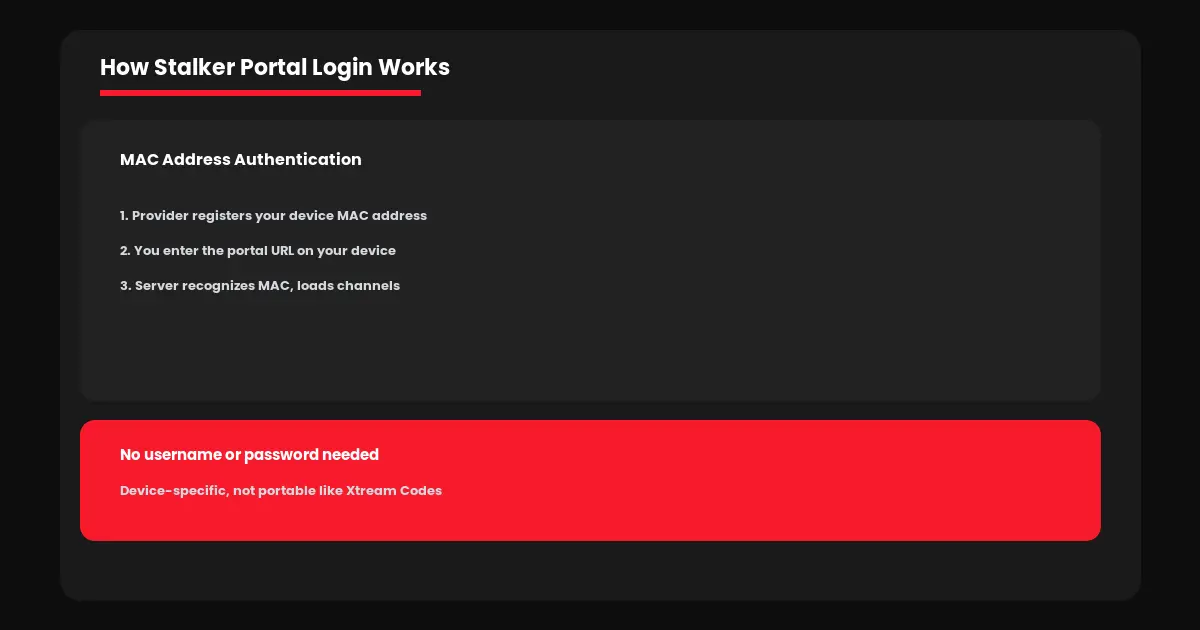
When you subscribe to a service offering IPTV Stalker Portal Canada access, your provider gives you two pieces of information — a portal URL and instructions to find your device's MAC address. Your provider then whitelists that specific MAC address on their server, tying your subscription directly to that one physical device rather than a reusable login you can enter anywhere.
This is fundamentally different from how M3U vs Xtream Codes connections work, where credentials can be entered into any app on any device. With Stalker Portal, switching devices typically means contacting your provider to update the registered MAC address — an extra step that trips up subscribers who are used to simply copying credentials between apps.
Which Devices Support Stalker Portal
IPTV Stalker Portal Canada compatibility is more limited than M3U or Xtream Codes, since the format was built with dedicated hardware in mind rather than general-purpose apps.
→ MAG boxes: Native Stalker Portal support built directly into the hardware — the original intended use case
→ Android devices: Apps like IPTV Stalker Client or STB Emulator replicate the experience on Android phones, tablets, and TV boxes
→ Firestick: Requires an emulator app since Stalker Portal has no native Firestick support out of the box
→ Smart TVs: Limited native support — usually requires a workaround app or external device
Because of this more limited compatibility, most Canadian IPTV providers today emphasize Xtream Codes and M3U as their primary connection methods, reserving Stalker Portal support mainly for subscribers using actual MAG hardware or specific legacy setups.
Stalker Portal vs M3U vs Xtream Codes
Seeing all three connection types side by side clarifies exactly where IPTV Stalker Portal Canada fits into the bigger picture.
| Factor | M3U | Xtream Codes | Stalker Portal |
|---|---|---|---|
| Login method | Playlist URL | User/pass | MAC address |
| Device flexibility | High | High | Low, tied to device |
| App availability | Universal | Universal | Limited, needs emulator |
| Best for | Kodi, VLC | Most users | MAG hardware owners |
For the vast majority of new subscribers, Xtream Codes remains the easiest starting point — see our Smarters Pro setup guide for the simplest path. IPTV Stalker Portal Canada access makes the most sense specifically if you already own MAG hardware or your provider specifically recommends it for a technical reason.
Common Stalker Portal Issues
Setting up IPTV Stalker Portal Canada access correctly avoids most of the common problems subscribers run into.
"MAC not registered" error: Your device's MAC address was not correctly whitelisted on the provider's server — contact support to verify it was entered correctly.
Portal loads but no channels: The subscription linked to your MAC address may have expired or not been activated yet on the provider's end.
Switched devices, lost access: Normal behavior — contact your provider to update the registered MAC address to your new device.
If buffering or streaming quality issues arise regardless of connection type, our complete buffering troubleshooting guide covers the fixes that apply universally across M3U, Xtream Codes, and Stalker Portal setups alike.
Ready to get connected? Visit IPTV Canada Officiel to discuss which connection method fits your setup, or start with a free 24-hour trial to test everything first.
Setting Up Stalker Portal Step by Step
If your provider does recommend IPTV Stalker Portal Canada access for your specific device, the setup process follows a consistent pattern regardless of which app or box you are using.
1. Find your device's MAC address, usually located in system settings or network settings on your MAG box or emulator app.
2. Send this MAC address to your provider so they can register it against your subscription.
3. Enter the portal URL your provider gives you into your device or emulator app's settings.
4. Restart the app or box — your channel list should load automatically once the server recognizes your registered MAC address.
Unlike Xtream Codes, there is no username or password to double-check for typos — most Stalker Portal issues trace back to the MAC address not being correctly registered on the provider's end, which is why confirming this step with support before troubleshooting further usually saves the most time.
Frequently Asked Questions — Stalker Portal Canada
Stalker Portal (now called Ministra) is a middleware system that identifies your device by its MAC address rather than a username and password, originally built for MAG set-top boxes.
Yes, but it requires an emulator app since Firestick does not natively support Stalker Portal the way MAG boxes do.
Not generally. Xtream Codes offers more device flexibility for most users. Stalker Portal makes sense mainly if you already own MAG hardware.
You will need to contact your provider to update the registered MAC address, since access is tied to your specific device's hardware identifier.
Yes. Ministra is the modern rebranded name for the same underlying Stalker Portal middleware system.