
IPTV on PS4, PS5, Xbox Canada — 2026 Guide
IPTV on PS4, PS5, Xbox Canada setups make sense for a very practical reason — your gaming console is often already connected to your main TV, powered on daily, and sitting right there without needing to buy any additional streaming hardware. If you already own one of these consoles, you may be closer to watching IPTV than you think.
This guide covers exactly how IPTV on PS4, PS5, Xbox Canada setups work, what limitations to expect compared to dedicated streaming devices, and the best workarounds for getting live TV running through your console. If a dedicated device makes more sense for your situation, our Firestick guide remains the simpler path for most households.
[rank_math_toc]
The Reality of IPTV on Gaming Consoles
Here is the honest starting point — neither PlayStation nor Xbox offers a native, dedicated IPTV app in their respective app stores the way Firestick or Android devices do. Sony and Microsoft have never built first-party support for third-party IPTV playback, which means IPTV on PS4, PS5, Xbox Canada setups rely on workarounds rather than a simple app download.
That said, workarounds exist and work reasonably well for casual viewing, even if they lack the polish of a purpose-built streaming device. Understanding what these consoles can and cannot do sets realistic expectations before you spend time trying to configure anything.
🌐
Browser Method Works
Web-based IPTV players run through the console browser
📵
No Native App
No official IPTV app in PlayStation or Xbox stores
🔌
Casting Alternative
Some setups allow casting from phone to console
IPTV on PS4 and PS5 — How It Works
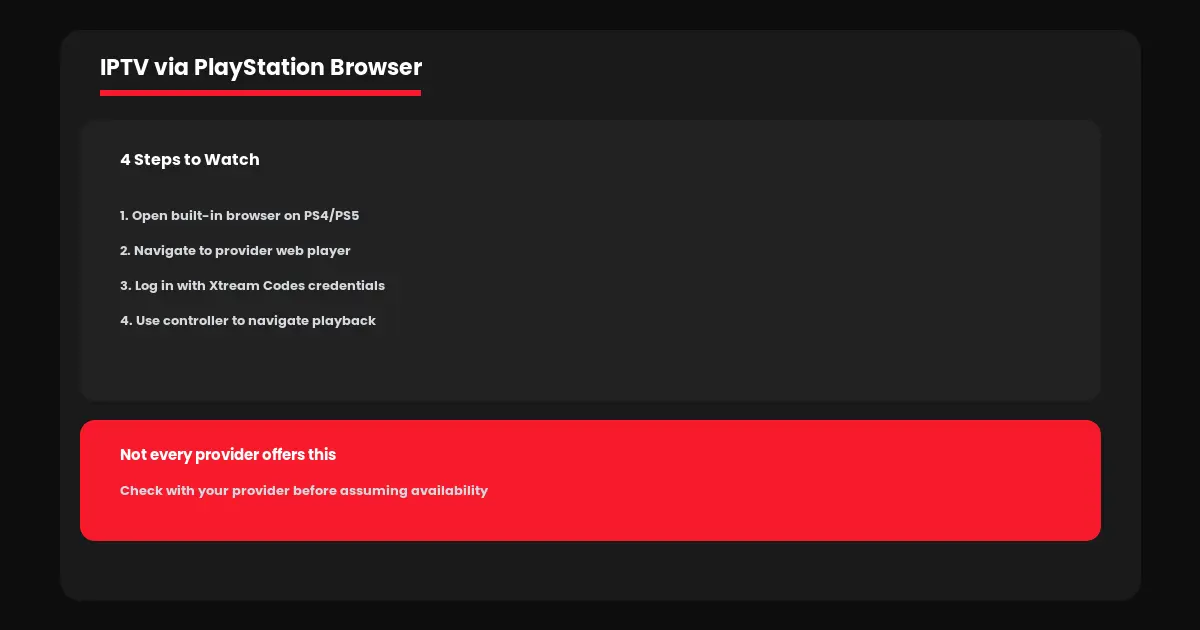
Both PS4 and PS5 include a built-in web browser, which is the most reliable path for IPTV on PS4, PS5, Xbox Canada setups on PlayStation hardware. Some IPTV providers offer a web-based player accessible through this browser, letting you enter your credentials and stream directly without installing anything.
1. Open the built-in browser from your PS4 or PS5 home screen.
2. Navigate to your provider’s web player URL, if they offer one.
3. Log in using your Xtream Codes credentials — see our M3U vs Xtream Codes guide if you need a refresher on this format.
4. Use the controller to navigate the on-screen player controls.
Not every provider offers this web player option, so check with your provider directly before assuming it is available. The browser experience is also noticeably less polished than a dedicated app — expect basic playback controls rather than a full EPG guide or catch-up features.
IPTV on Xbox — What to Expect
Xbox consoles also include Microsoft Edge as a built-in browser option, functioning similarly to the PlayStation approach for IPTV on PS4, PS5, Xbox Canada setups. The same web-player limitation applies — you are dependent on your provider offering browser-based access, since no native IPTV app exists in the Xbox store.
Xbox also supports casting from certain Windows devices, which offers an alternative path — casting a stream from a laptop running IPTV via VLC or Kodi to your Xbox display, though this depends on your specific casting setup and is not a universal solution.
Why a Dedicated Device Usually Works Better
Honestly comparing IPTV on PS4, PS5, Xbox Canada setups against dedicated streaming devices, the console approach comes with real tradeoffs worth knowing upfront.
| Factor | Console Browser | Firestick/Android |
|---|---|---|
| EPG guide | Rarely available | Full support |
| App options | Provider-dependent | Smarters Pro, TiviMate, more |
| Setup cost | $0 if you own console | ~$69 for Firestick |
If IPTV becomes a regular habit rather than an occasional check, investing in a $69 Fire TV Stick genuinely pays for itself quickly through a smoother EPG, better app selection, and support for features like catch-up TV that most console browsers simply cannot replicate.
Common Issues With Console-Based IPTV
Since IPTV on PS4, PS5, Xbox Canada setups rely on browser workarounds, a few recurring issues come up more often than with dedicated apps.
Browser player won’t load: Console browsers sometimes lack support for the video codecs certain providers use — try a different provider’s web player if available.
Frequent buffering: Console browsers are not optimized for streaming the way dedicated apps are. See our buffering troubleshooting guide for connection-related fixes.
Controller navigation is clunky: This is a known limitation of browser-based playback — there is no real fix beyond switching to a dedicated device.
Ready to explore your options? Visit IPTV Canada Officiel to check provider compatibility, or start with a free 24-hour trial to test the browser method on your specific console before committing to a subscription.
An Alternative Worth Considering
Rather than fighting browser limitations for IPTV on PS4, PS5, Xbox Canada setups, many households find it simpler to keep the console purely for gaming and add a small dedicated streaming device for TV viewing on the same screen. Since most consoles are already connected via HDMI, a Fire TV Stick or Android TV box plugs into a second HDMI port on the same television, letting you switch inputs with your remote exactly like switching between a game console and a cable box.
This approach costs under $70 one time and eliminates every limitation of browser-based playback — full EPG access, proper app support, and reliable performance without depending on your provider offering a compatible web player at all. For most people who tried the console route and found it frustrating, this small investment solves the problem permanently.
Frequently Asked Questions — IPTV on Gaming Consoles
No. Neither PlayStation nor Xbox offers a dedicated IPTV app. Access relies on your provider offering a browser-based web player instead.
Yes, through the built-in Microsoft Edge browser if your provider offers a compatible web player, similar to the PlayStation approach.
Generally yes. A Firestick offers full EPG support, more app choices, and a smoother experience than browser-based console playback.
Console browsers sometimes lack support for specific video codecs. Not every provider offers a console-compatible web player.
In some cases, yes, particularly with Xbox and certain Windows casting setups, though this is not a universal or guaranteed solution.